Skip to content

Practice Labs

Work an incident.
Build the skill.

Start with your first Splunk search and learn to investigate suspicious activity yourself. Try a free live introduction, then continue with guided lessons and feedback through a paid programme. Keep your searches, timelines and reports to explain in interviews.

Inside your lab

One workspace for the investigation.

Your environment opens in the browser. Use the SIEM, inspect endpoints, ask for guidance and record your findings as you work.

A living enterprise network

Work with Active Directory, Windows workstations and Splunk on cloud infrastructure. Ordinary logins, file activity and process events sit alongside the incident, so you practise separating suspicious activity from everyday noise.

Attack scenarios with evidence to follow

Investigate activity across hosts and users: suspicious logins, malicious file execution, phishing traffic and insider threats. As you progress, the advanced labs introduce autonomous adversary investigations.

Guidance when you get stuck

The AI lab assistant uses your lab context to help you reason through the next step. Ask about a log field or SPL query, then work through a nudge, a guide or a more detailed walkthrough.

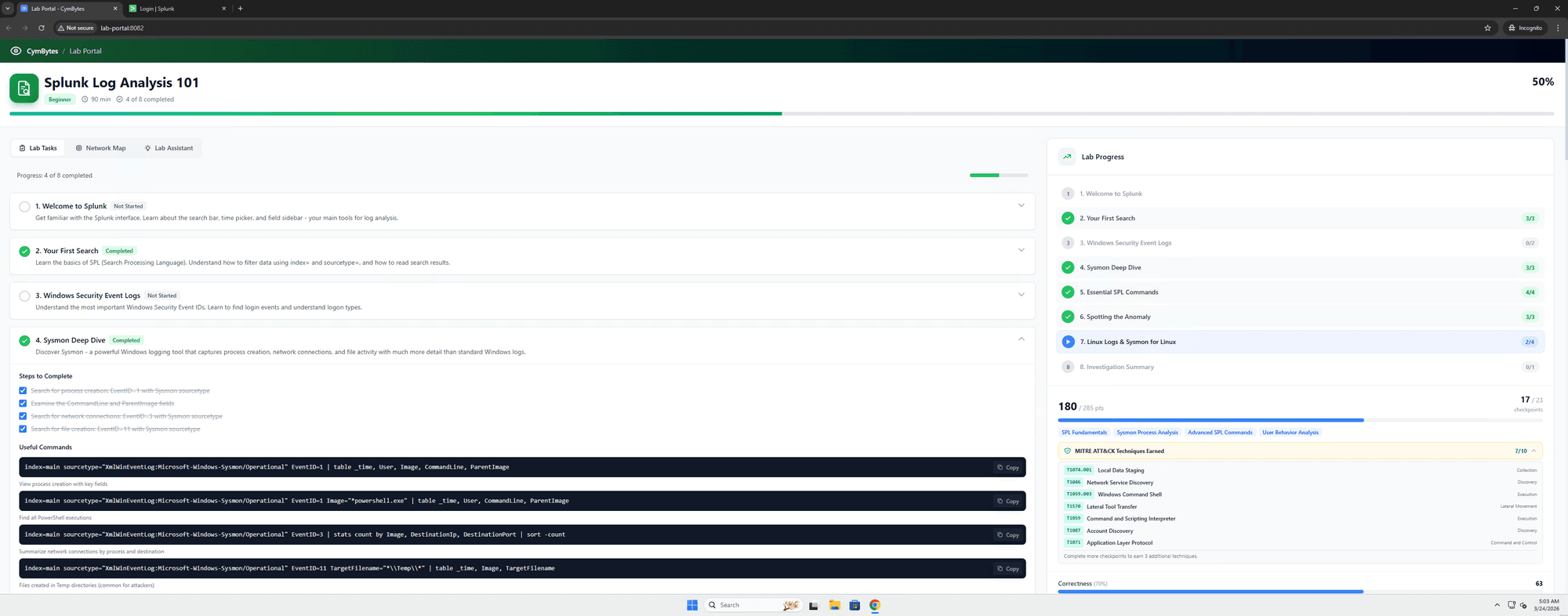
CymBytes lab workspace with investigation tools and guidance
The CymBytes lab workspace.

SOC foundations

Start with a search.
Finish an investigation.

Five course labs build on each other. Start with Splunk First Steps for free, then continue through Windows logs, detections, a full insider threat investigation and the malicious-file-execution capstone. Your free account also includes the introductory live class; the dashboard shows its date and invitation status.

  1. 01 / FREE FIRST LAB

    Splunk First Steps

    Search a real Splunk index and answer the first questions a SOC asks of a log.

  2. 02

    Reading Windows Logs

    Read Windows security and Sysmon events well enough to spot a logon that should not be there.

  3. 03

    SPL Detective

    Write your own SPL to hunt across hosts and users instead of clicking through alerts.

  4. 04

    Insider Threat Investigation

    Run a full insider-threat investigation on a live domain: build the timeline, state the affected scope and write the escalation handoff.

  5. 05

    Malicious File Execution

    Capstone. Trace a malicious file from download to execution across endpoint and SIEM telemetry, then write the incident report. Submit your report for assessment toward the CymBytes SOC L1 Certificate.

Scoring and evidence

See how you investigated.

Scored checkpoints assess the queries you run and the evidence you collect. Your incident timeline and report show how you reached a conclusion, alongside the time taken at each stage.

Use your session reports to review strengths, find gaps and explain your lab work in interviews.

CymBytes SOC L1 Certificate

Submit an incident report and earn a final score of 70 or more in each of the five required foundation labs, with a plan that includes the certificate. Issued by CymBytes for assessed lab performance. Its public verification link records the completed labs and scores.

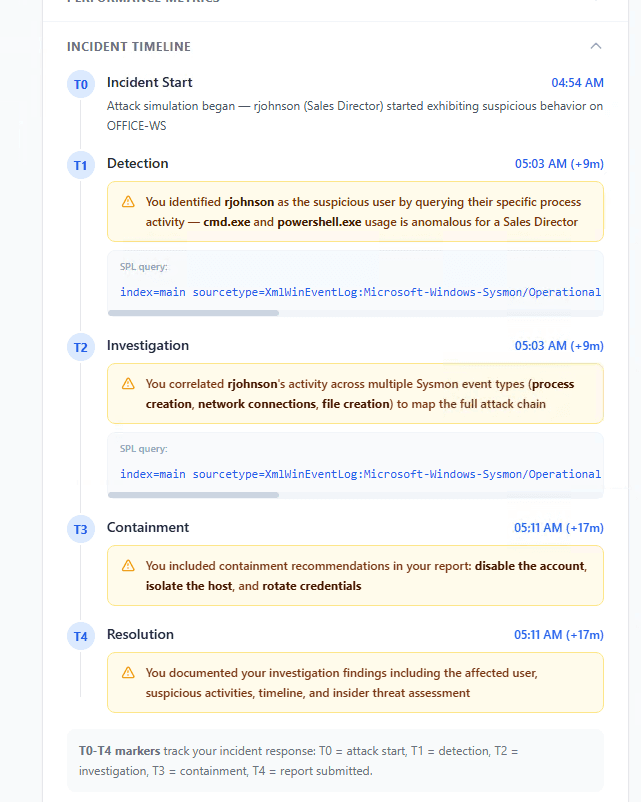
An incident timeline showing detection, investigation and containment milestones
An example incident timeline from the platform.

Read an example investigation.

Example lab investigation · report excerpt

Investigating suspicious activity on a sales workstation

This example comes from the incident timeline shown on this site. The account and events belong to the lab scenario.

Question
Does the activity on OFFICE-WS need further investigation?
Evidence
The learner searched Sysmon events for the rjohnson account, then correlated process creation, network connections and file activity.
Finding and recommendation
The report identified unusual cmd.exe and PowerShell activity for the sales role, and recommended disabling the account, isolating the host and rotating credentials.
Recorded work
The timeline retains the searches, investigation milestones and a summary of the written findings. Containment here records recommendations in the report; it does not demonstrate that a production system was contained.
Open the original report excerpt →

What the score tells you

The session report separates correctness, speed and process, alongside checkpoint results and the incident timeline. Use these to review the evidence found, the steps taken and where another attempt would help.

A score describes performance in that lab. It is not a probability of getting hired or a measure of professional seniority. This excerpt shows the investigation record, not an overall score.

Choose how you want to practise.

Use the labs independently, or join the live programme for scheduled sessions with the instructor. The programme page has the curriculum, timetable and fees.

“Building practical learning environments that help people move from saying ‘I know the concept’ to ‘I have actually worked with it’.”
Karthik Donepudi — SOC analyst candidate. Read his LinkedIn post